All docs pages (49)
SOQL Builder
Build, run, and export SOQL queries visually — no syntax memorization required.
Updated 2026-02-15
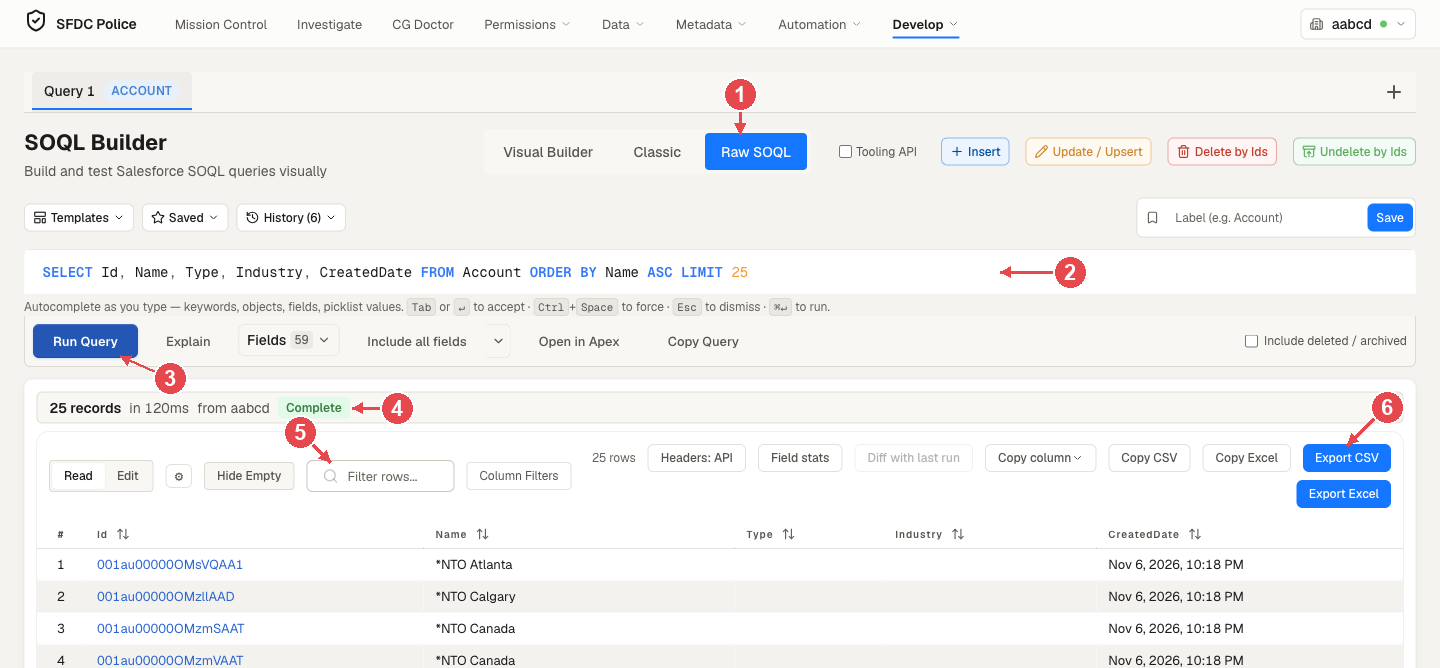
The SOQL Builder gives you a visual interface to construct and run SOQL queries against any Salesforce org. No need to memorize syntax or guess field names.
Features
Visual Query Builder
Select your object, pick fields from a dropdown, add WHERE clauses, set ORDER BY and LIMIT — the SOQL text updates as you build.
- Select from all standard and custom objects
- Checkbox field picker with search
- Visual WHERE clause builder (field, operator, value)
- ORDER BY with ASC/DESC toggle
- LIMIT box (up to 50,000) with quick picks from 10 to 2,000
Query Editor
Switch to the SOQL editor at any time to fine-tune your query or paste an existing one.
- Syntax highlighting for SOQL keywords
- Field name autocomplete
- Salesforce's error message shown when a query fails
- The error underlined in the query, with plain-word fixes (from version 1.1.13)
- Query history (last 50 queries)
Results Table
Results are displayed in a sortable, filterable table. You can:
- Sort any column ascending or descending
- Filter rows by keyword
- Click any record ID to open it in Salesforce
- Expand relationship fields
Export Options
Export your results in multiple formats:
- CSV — comma-separated for Excel/Sheets
- Excel — a
.xlsxfile - Copy to clipboard — as CSV, or as tab-separated text that pastes into Excel
Access
SOQL Builder — like every other module — is fully unlocked and free. No subscription, no trial, no account required.
Example Queries
-- Find all active users
SELECT Id, Name, Email, Profile.Name
FROM User
WHERE IsActive = true
ORDER BY Name ASC
LIMIT 50

-- Custom object with relationship query
SELECT Id, Name, Account.Name, CreatedDate
FROM Contact
WHERE Account.Type = 'Customer'
ORDER BY CreatedDate DESC
LIMIT 100