All docs pages (49)
Related Records
Open a record and click through its parent lookups and child lists, without writing SOQL.
Updated 2026-11-07
For six real use cases with screenshots, read Related Records: everything connected to a record.
Related Records lets you move through your Salesforce data one record at a time and see how records connect across objects, without writing SOQL or opening multiple tabs.
Features
Record Explorer
Open a record and see its parent lookups and the child lists that have records:
- Parent relationships (lookup and master-detail)
- Child relationships that have at least one record (lists with no records are hidden)
- Polymorphic lookups, resolved to the right object
A child list pages through up to 2,000 records (the Salesforce limit for SOQL OFFSET).
Click Through
Click a related record's Id to open it and see its own parents and children. A breadcrumb keeps your path (the starting record plus the last 9 steps). Child lists load their records when you open them.
Record Preview
Click elsewhere on a row in a child list and the side panel shows that row's fields, without leaving the current record. The panel also has History (field history) and Cascade tabs.
Export
Export downloads the current record's fields (API name, label, type and value) as CSV or JSON.
Child lists that load as they're counted (from version 1.1.13)
Related lists appear as soon as their counts arrive; the heading says "still counting…" until the last one, and you can open a list meanwhile. Lists are counted in groups (one query asks up to 20 relationships whether they have any records, then only the lists that do are counted), so a large account loads in about 2 seconds instead of 10 and uses far fewer API calls. A list is hidden only when Salesforce says it has no records.
Readable names and a filter (from version 1.1.13)
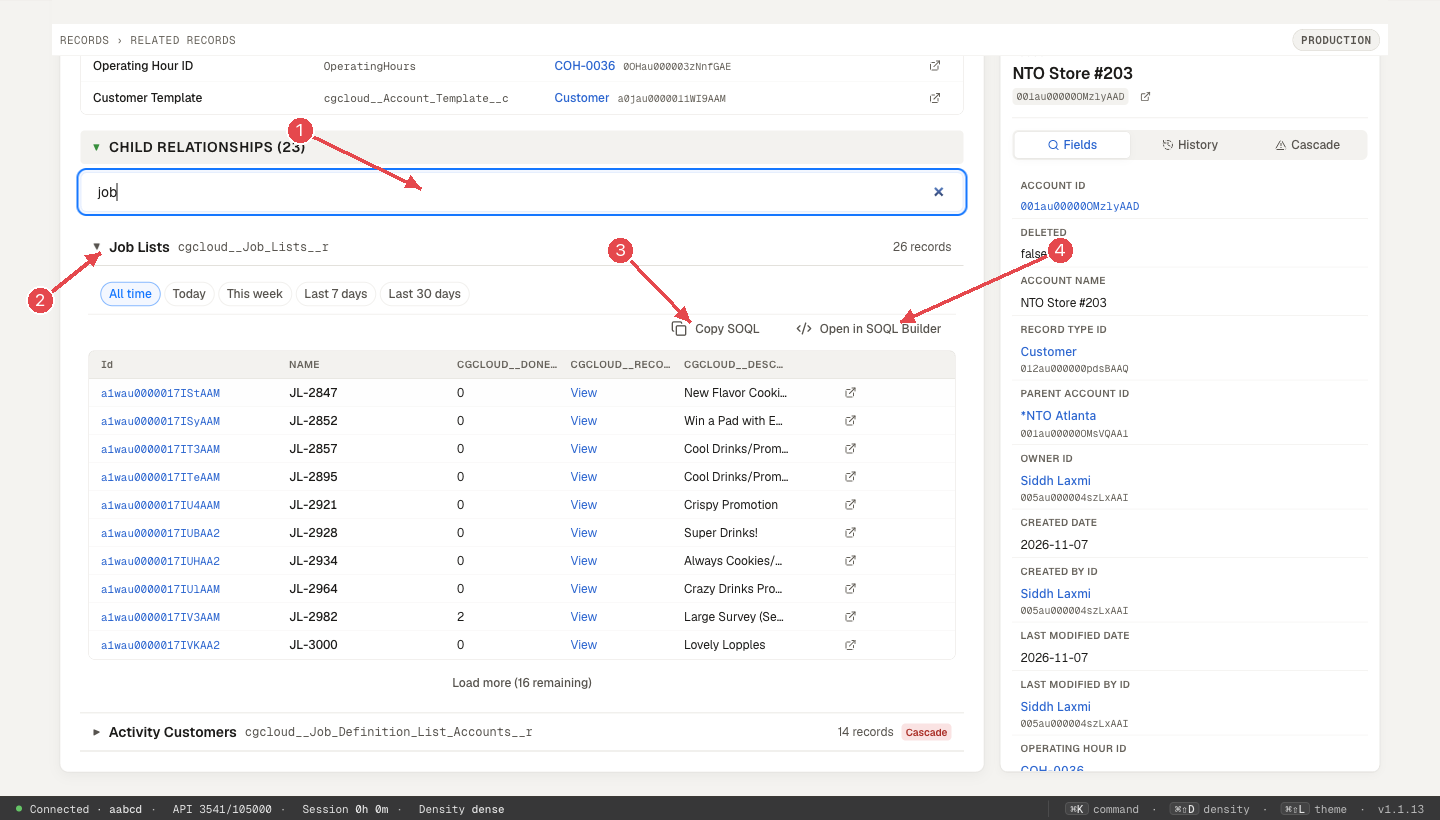
Each child list shows its object's label ("Job Lists", "Visits") with the relationship API name beside it; hover for the object and lookup field. With more than five lists, Filter related lists narrows them by label, API name or object.
Copy SOQL / Open in SOQL Builder (from version 1.1.13)
An open list has Copy SOQL and Open in SOQL Builder. Both use the list's own query (same fields, the parent filter and the date chip you picked, same order) without the page's 10-row limit, so SOQL Builder runs it over all records.
Formula fields (from version 1.1.13)
Hyperlink and image formula fields show as a link or as text, never as raw HTML. Only http(s) and relative links become links.
Use Cases
- Data investigation — quickly trace data from a case back to the account
- Impact analysis — see the child records a parent's delete would cascade to directly (one level)
- Documentation — map out complex data models for new team members
- Migration prep — understand record dependencies before migrating data